
Unleash Your Inner Designer: Create Stunning Visuals in Seconds with CapCut Web AI Design
 SKAiF NewsNG SNN

Tired of spending hours on small edits? You know that moment when you open a design project and realize you’re about to lose an entire evening tweaking layers and trimming edges? I’ve been there too. That’s exactly why I started using CapCut Web AI design. It takes the long, messy part out of the process and lets you focus on the fun side of creating.
Everything happens right inside your browser—no downloads, no steep learning curve. You type what you imagine, and the AI gets it done in seconds. Whether I’m building a quick promo post or a brand visual, CapCut Web feels more like a creative partner than a tool.
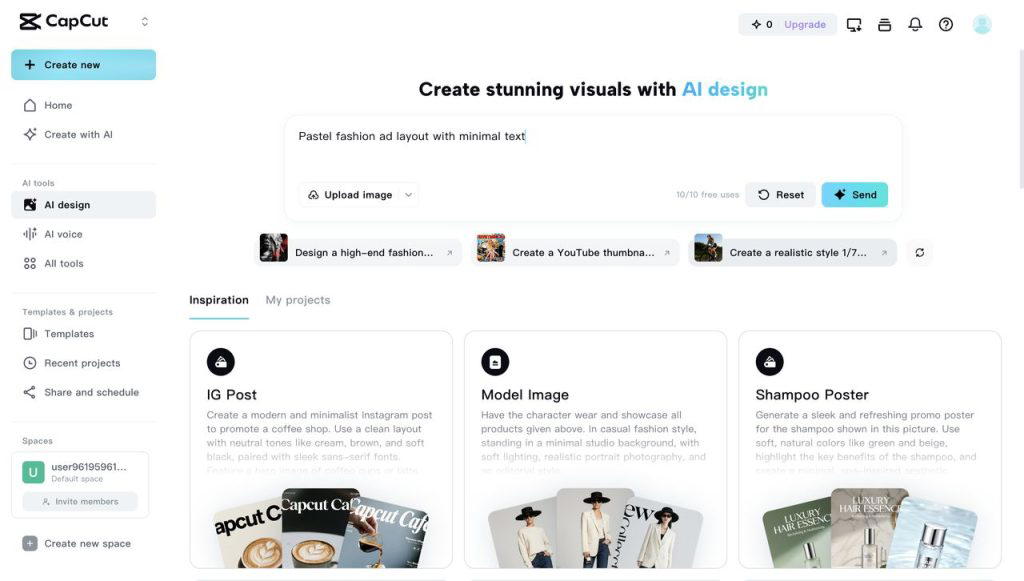
Unlock the powers of AI design tools
The whole system runs on Seedream 4.0, a creative model developed by ByteDance. Think of it as a behind-the-scenes artist that understands color, lighting, and context better than most editing software I’ve ever used.
Here’s what makes it surprisingly easy to fall in love with:
1. One-sentence creation magic with transparent perfection
I tested this the first day I signed in. I typed, “soft vintage poster with floral typography,” and watched it appear, perfectly styled, in under ten seconds. It honestly felt like cheating.
Even better, the built-in transparent background maker saves hours of cleanup. You upload an image, click once, and the background disappears—clean edges, no weird halos. Then, tap “Design with AI” to build a new background powered by Seedream 4.0. Just type a quick prompt—like “a bright studio with warm light” or “a pastel room with plants”—and the AI creates it instantly. You can also choose from ready-made AI scenes, from cozy indoor setups to mountain views or simple white spaces.
The exports come as crisp PNG files, ready for any website or social platform. I’ve used it for product listings, blog headers, and social thumbnails. Each time, it looks like something I spent hours perfecting.
2. Intelligent editing meets effortless branding
Here’s where the smart part really shines. CapCut Web keeps your layout consistent while you experiment. If I change the word “Summer” to “Autumn,” the font and alignment stay intact. If I replace a cup of coffee with a glass of iced tea, the lighting still makes sense.
And when I needed a quick logo for a side project, I tried the AI logo generator. I just entered “modern tech logo with blue gradient” and it gave me several professional designs in seconds. I picked one, tweaked the color, added a tiny icon, and that was it.
No Illustrator. No designer fees. Just instant branding that actually looked custom-made.
3. Endless visual styles and moods
Sometimes I like to play around with styles just to see what happens. CapCut’s AI makes that super easy. I can take one image and turn it into a watercolor painting, a cyberpunk city scene, or a dreamy sketch—without losing the structure of the original.
What impressed me most was how natural everything looks. The proportions and lighting stay believable, even when you switch between totally different vibes. It feels like creative exploration, not trial and error.
4. Power and performance under the hood
Everything I’ve mentioned runs on Seedream 4.0, and it’s not hype. The model has been benchmarked in MagicBench and Artificial Analysis Image Arena, ranking near the top for accuracy and visual quality.
In plain English? What you describe is what you get. The colors look balanced, the composition feels natural, and you can even generate up to 4K-resolution visuals straight from the browser.
It’s reliable enough for client projects and quick enough for social media deadlines.
5. Made for everyone with creative ideas
I’m not a full-time designer, and that’s exactly why I appreciate how approachable CapCut Web is. The interface is clear, the learning curve basically nonexistent, and you can experiment freely without breaking anything.
Teachers, small business owners, marketers—anyone who needs professional visuals but doesn’t have time to learn complex software—can use this tool comfortably. It’s made for everyday creators who just want things to look good, fast.
More than an editor—it’s a full creative ecosystem
CapCut Web is way more than a design tool. It’s packed with extra AI features that make content creation feel like a breeze:
• AI video maker
This tool turns plain text into complete, ready-to-publish videos. Just drop your script, pick a realistic voice, and choose a matching visual style — the AI automatically handles timing, transitions, and scene layout. In a few minutes, you have a professional-looking video that feels tailor-made for your content.
• AI caption generator
Captions can make or break engagement, especially on social media. CapCut’s caption generator automatically detects speech and adds timed subtitles in multiple languages with clean formatting. It’s perfect for creators who post globally and want accessibility without spending hours typing line by line.
• Long video to shorts
This one’s a total game changer for repurposing content. Upload a full-length video, and the tool intelligently identifies highlight moments — trimming them into short, catchy clips optimized for TikTok, YouTube Shorts, or Reels. You can customize each clip’s ratio, duration, and layout before exporting for instant upload.
• AI voice tools
Recording voiceovers can be awkward or time-consuming, but this feature fixes that instantly. Type your narration, pick from expressive voice options, and let the AI bring it to life with natural intonation and rhythm. You can even match tones — from energetic influencer vibes to calm, professional narrations — without touching a mic.
It’s the kind of toolkit that quietly removes all the friction in your workflow.
Design the way you imagine it
After using CapCut Web for a few weeks, I honestly stopped opening half my old editing apps. The combination of AI design, transparent background maker, and AI logo generator covers nearly everything I need for branding and content creation.
You can jump from an idea to a final design without losing momentum, and that changes how you think about creativity.
If you’ve been stuck in the cycle of manual edits and endless downloads, give CapCut Web AI design a try. It’s not just efficient—it’s inspiring. And once you see your ideas appear on screen in seconds, it’s hard to go back.
The post Unleash Your Inner Designer: Create Stunning Visuals in Seconds with CapCut Web AI Design appeared first on Vanguard News.